install.packages("ReliaShiny")8 Web-Based Analysis with ReliaShiny
8.1 Introduction
All of the analyses in this book require writing R code. ReliaShiny (Govan 2023) removes that requirement; it is a point-and-click Shiny (Chang et al. 2022) web application that exposes the same reliability analysis workflows (life data analysis, reliability growth, accelerated life testing, repairable systems) through a graphical interface. No R programming knowledge is needed to run an analysis.
This chapter introduces ReliaShiny, tours its modules, and explains when to reach for it versus a scripted R workflow.
8.2 Installation and Launch
ReliaShiny is available on CRAN:
Once installed, launch the app from the R console:
library(ReliaShiny)
ReliaShiny()
This opens the application in your default web browser. The app runs locally; no internet connection or account is required.
8.3 App Overview
When ReliaShiny opens, the left sidebar displays the available analysis modules, each corresponding to a chapter in this book:
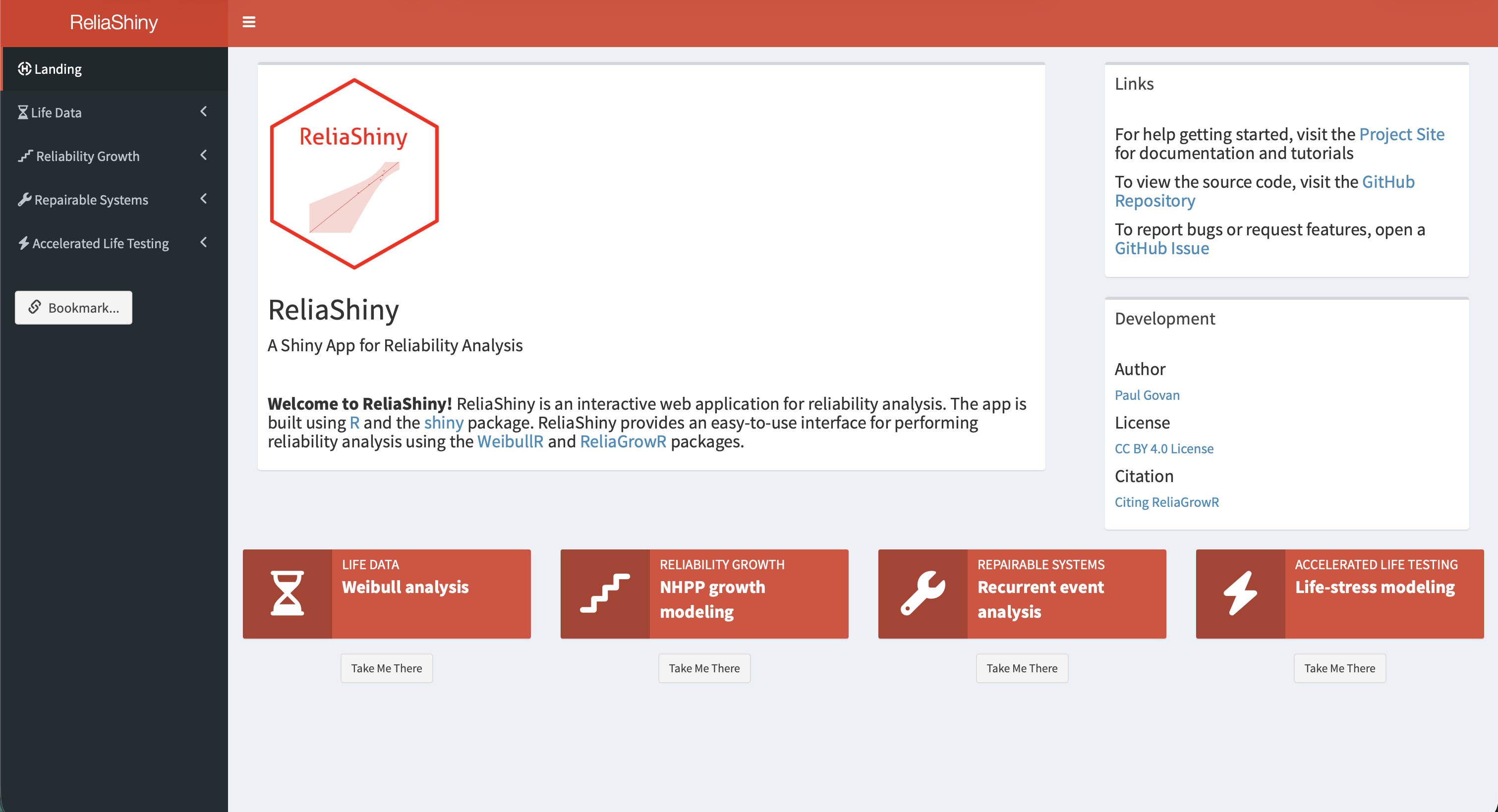
| Module | Corresponding chapter | Key capabilities |
|---|---|---|
| Life Data Analysis | Chapter 3 | 2-parameter, 3-parameter Weibull, Weibayes; MRR and MLE; right-censored data |
| Reliability Growth | Chapter 4 | Duane and Crow-AMSAA model fitting; piecewise NHPP |
| Accelerated Life Testing | Chapter 5 | Arrhenius and Power Law models; relationship plots |
| Repairable Systems | Chapter 6 | Power Law Process (NHPP); MCF; fleet exposure |
Each module follows the same three-step workflow:
- Input: enter or upload your data using form fields, tables, or file uploads.
- Analyze: click Run to fit the model.
- Output: view plots, parameter estimates, and summary statistics; download results.
8.4 Module Walkthroughs
Life Data Analysis Module
The LDA module fits Weibull models and generates probability and contour plots. The app includes a preloaded Time-to-Failure dataset so you can explore the workflow immediately without uploading data.
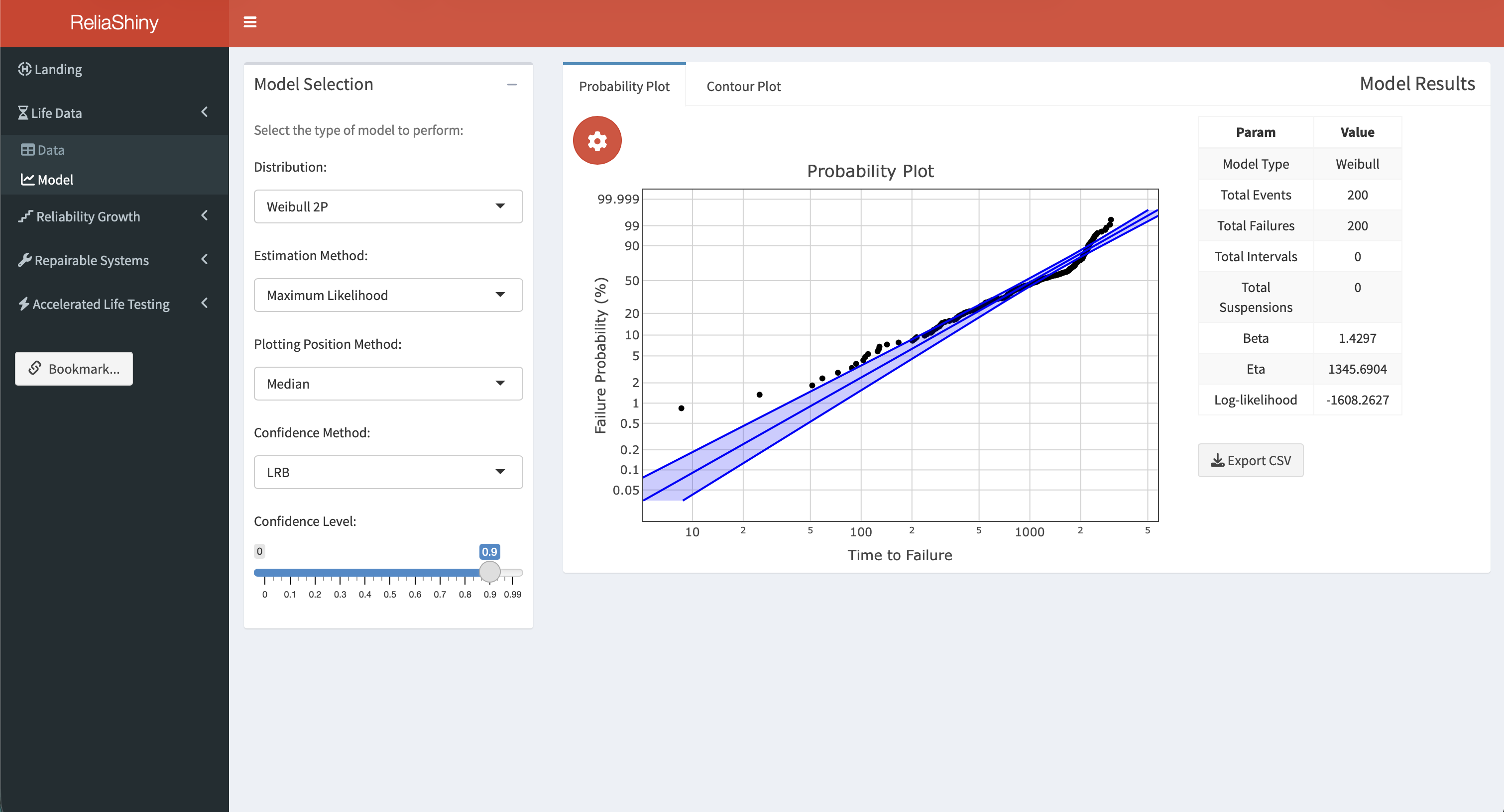
Workflow:
- Select the Life Data Analysis tab in the sidebar.
- Navigate to the Data sub-menu. The preloaded Time-to-Failure dataset is already loaded; explore additional options for data arrangement or upload your own CSV with columns
timeandevent(1 = failure, 0 = suspension). - Navigate to the Model sub-menu. Select the distribution (2-parameter Weibull by default) and estimation method (MRR or MLE).
- Click Fit Model. The Probability Plot appears in the main panel, with \(\hat{\beta}\), \(\hat{\eta}\), and the Anderson-Darling statistic.
- Switch to the Contour Plot tab for an interactive likelihood ratio contour showing the joint confidence region for \(\hat{\beta}\) and \(\hat{\eta}\).
- Click Download Plot to save the current chart as a PNG.
CSV format for upload:
time,event
30,1
49,1
82,1
90,1
96,1
100,0
45,0
10,0
A 0 in the event column marks a suspension (right-censored observation).
See the Life Data Analysis article for a full walkthrough.
Reliability Growth Module
The Reliability Growth module fits Crow-AMSAA and Duane reliability growth models. The app includes a preloaded Simple Data dataset for immediate exploration.
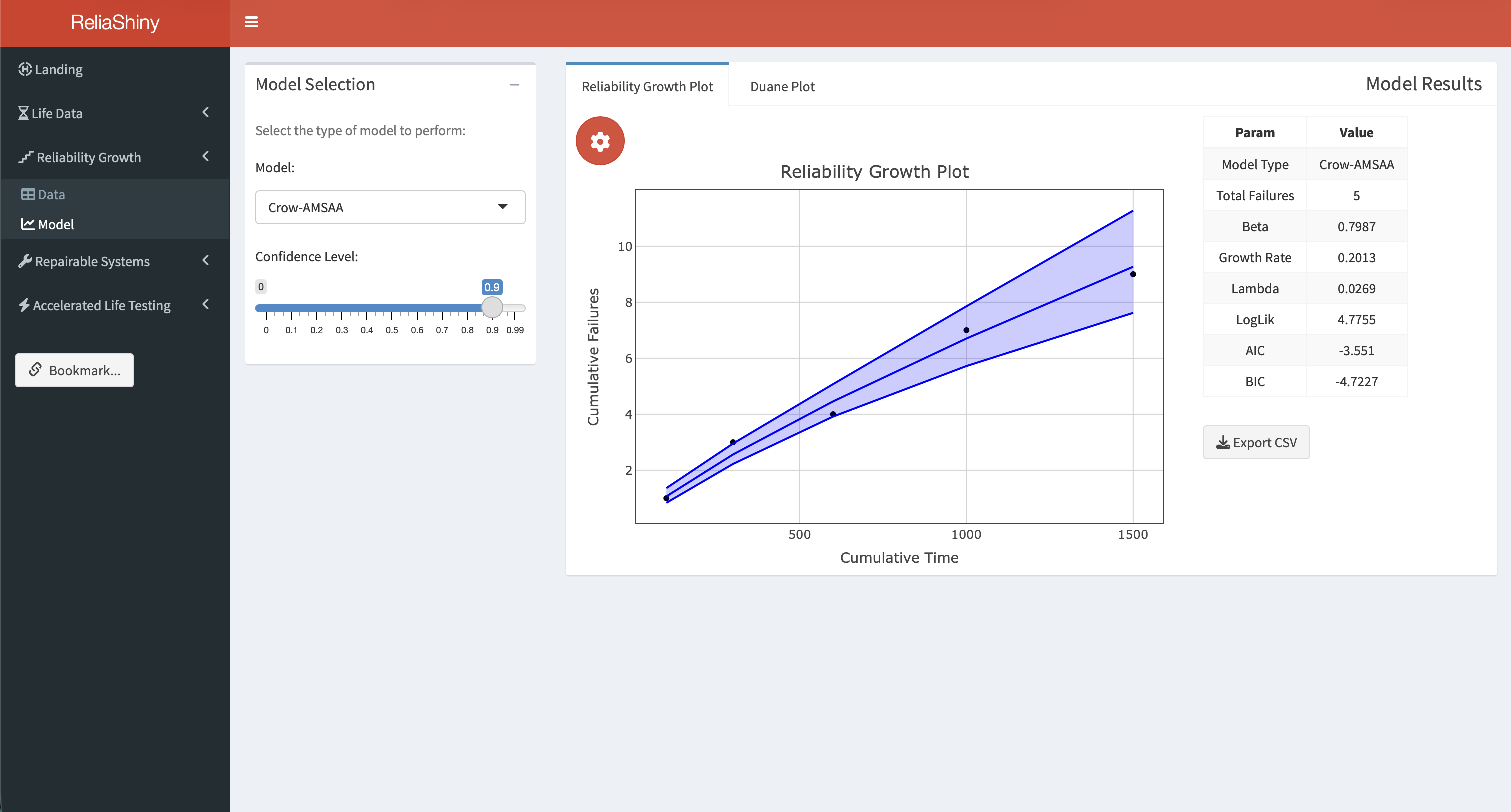
Workflow:
- Select Reliability Growth in the sidebar.
- Navigate to the Data sub-menu. The preloaded Simple Data dataset is loaded; designate the failures column as the failure indicator, or upload your own data.
- Navigate to the Model sub-menu.
- Click Fit. The Reliability Growth Plot (Crow-AMSAA cumulative failures) appears with the fitted curve and \(\hat{\beta}\).
- Switch to the Duane Plot tab to view the log-log cumulative MTBF plot for the same data.
See the Reliability Growth Analysis article for a full walkthrough.
Accelerated Life Testing Module
The ALT module fits Arrhenius and Power Law acceleration models using the WeibullR.ALT package (see Chapter 5). The app includes the preloaded Nelson Data dataset.
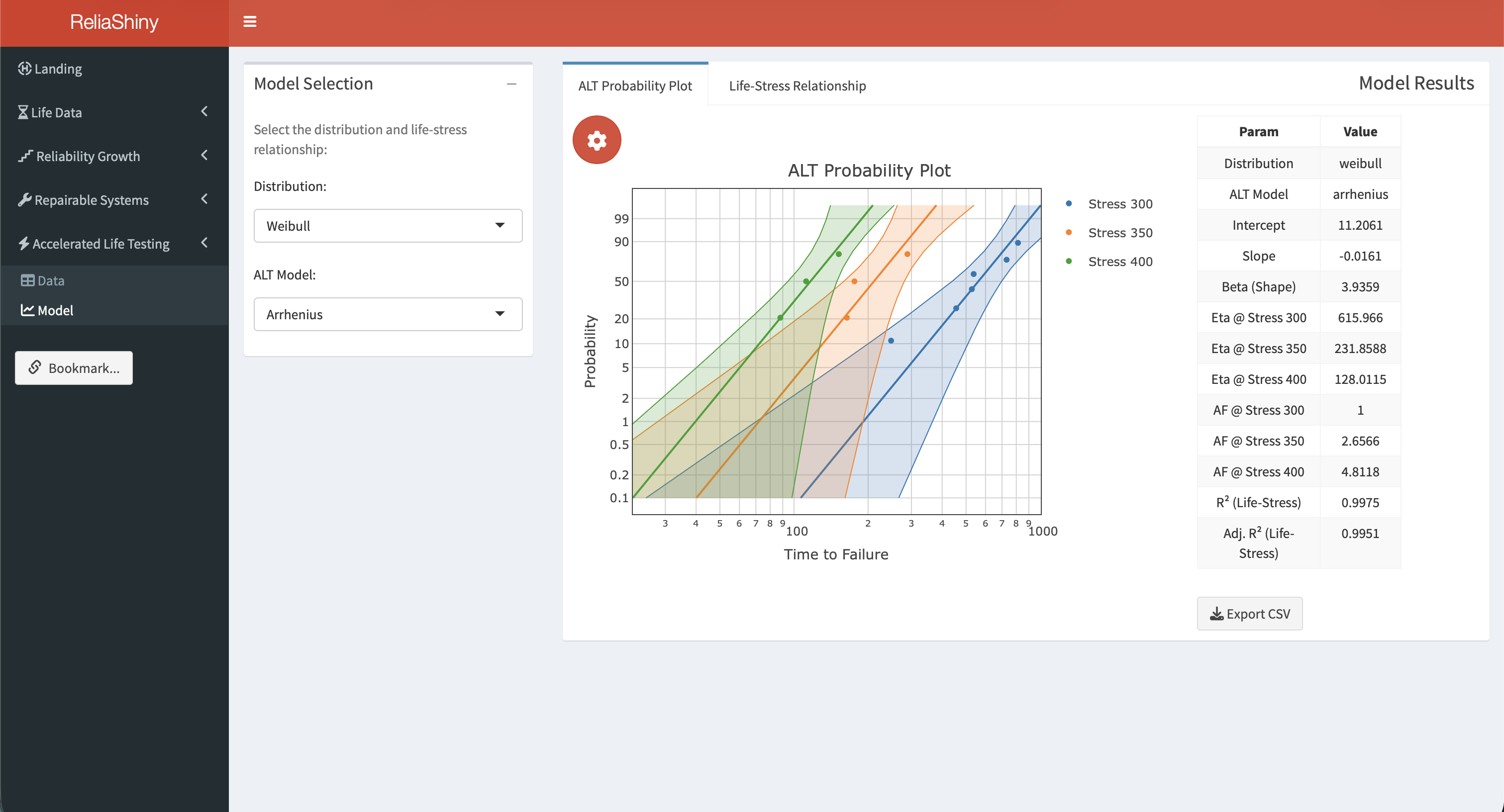
Workflow:
- Select Accelerated Life Testing in the sidebar.
- Navigate to the Data sub-menu. The preloaded Nelson Data is already loaded. Map the columns: select the Stress Level, Time to Failure, and Event Indicator columns from the dropdowns.
- Navigate to the Model sub-menu. Choose the acceleration model (Arrhenius for temperature, Power Law for voltage/mechanical stress) and distribution (Weibull or Lognormal).
- Click Fit ALT Model. The ALT Probability Plot appears, with one curve per stress level.
- Switch to the Life-Stress Relationship tab to view how predicted life varies across the stress range, with percentile lines (P10, P63.2, P90).
See the Accelerated Life Testing article for a full walkthrough.
Repairable Systems Module
The Repairable Systems module fits the Power Law Process (Crow-AMSAA) and computes the MCF and exposure for fleet data. The app includes a preloaded Simple Data Set.
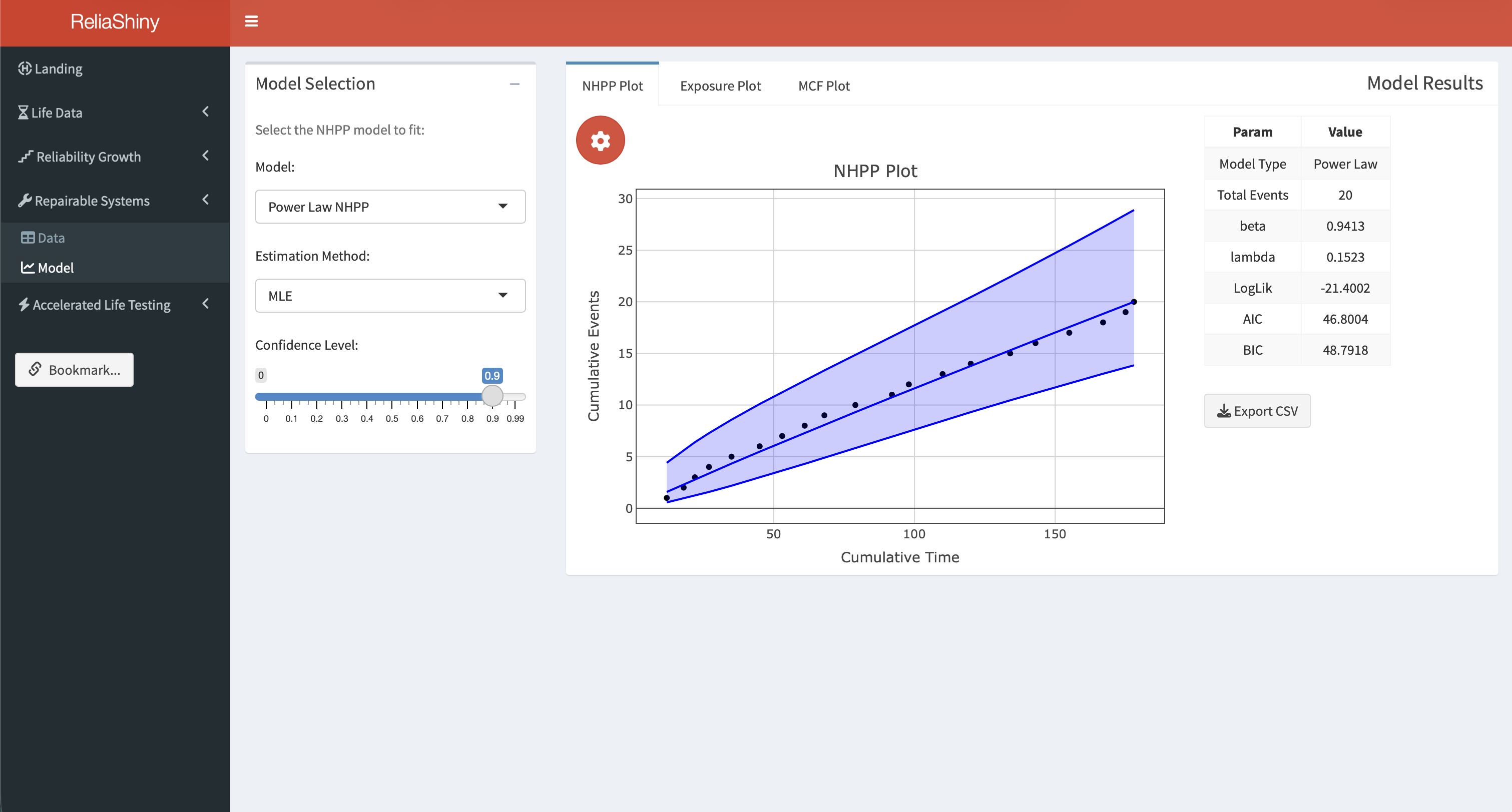
Workflow:
- Select Repairable Systems in the sidebar.
- Navigate to the Data sub-menu. The preloaded Simple Data Set is loaded; map the System ID, Event Time, and Event Indicator columns, or upload your own fleet data with columns
id,time, andevent. - Navigate to the Model sub-menu.
- Click Analyze. Three plots are produced:
- NHPP Plot: Crow-AMSAA Power Law fit with cumulative failures curve and \(\hat{\beta}\), \(\hat{\lambda}\).
- Exposure Plot: fleet-level event rate as a function of operating time.
- MCF Plot: non-parametric Mean Cumulative Function with confidence bounds.
Example CSV format:
id,time,event
1,310,1
1,850,1
1,1620,1
2,420,1
2,1050,1
2,3000,0
The last row for system 2 (event = 0) indicates that system 2 was observed until hour 3,000 without a third failure.
See the Repairable Systems Analysis article for a full walkthrough.
8.5 Data Upload Tips
- CSV files: core column names (
time,event,id,qty) are case-sensitive and must be lowercase. Stress column names (e.g.,TempC,Voltage) may use any valid R name; they are selected in the app’s dropdown. - Missing values: rows with
NAin thetimecolumn are automatically excluded. - Large datasets: the app handles datasets up to ~10,000 rows without performance issues.
- Units: ReliaShiny is unit-agnostic; use hours, years, cycles, or any consistent unit. Label your outputs accordingly.
8.6 Downloading Results
Every module provides download buttons for:
- Plot PNG: the current chart at screen resolution.
- Results CSV: parameter estimates and summary statistics in tabular form.
- Report HTML: a self-contained report combining the inputs, plot, and results (available in LDA and RT modules).
8.7 When to Use ReliaShiny vs Scripted R
| Situation | ReliaShiny | Scripted R |
|---|---|---|
| Quick one-off analysis | ✅ | |
| Teaching / demonstration | ✅ | |
| Sharing with non-R users | ✅ | |
| Automating repeated analyses | ✅ | |
| Custom plots and formatting | ✅ | |
| Reproducible research / version control | ✅ | |
| Embedding results in a Quarto book | ✅ | |
| Large batch processing | ✅ |
ReliaShiny excels at rapid exploration, prototyping, and sharing results with stakeholders who do not use R. For production workflows, automated pipelines, and fully reproducible analyses, scripted R with the underlying packages (WeibullR, ReliaGrowR, WeibullR.ALT) gives more control.
8.8 Getting Help
Within the app, click the ? icon on any panel for a tooltip explaining the inputs and outputs for that module.
From R:
help(package = "ReliaShiny")Additional resources:
- CRAN page: https://CRAN.R-project.org/package=ReliaShiny
- Articles and walkthroughs: https://paulgovan.github.io/ReliaShiny/
8.9 Summary
ReliaShiny provides a point-and-click interface to the ReliaLearnR analysis ecosystem, covering life data analysis, reliability growth, accelerated life testing, and repairable systems, with no R coding required. Install it with install.packages("ReliaShiny") and launch it with ReliaShiny(). Use it for rapid exploration, stakeholder demonstrations, and sharing results; switch to scripted R for reproducibility, automation, and custom outputs.
Chang, Winston, Joe Cheng, JJ Allaire, et al. 2022. Shiny: Web Application Framework for r. https://doi.org/10.32614/CRAN.package.shiny.
Govan, Paul. 2023. ReliaShiny: A ’Shiny’ App for Reliability Analysis. https://doi.org/10.32614/CRAN.package.ReliaShiny.